

Fabio Augusto Miranda Martins
on 2 September 2021
At the end of April 2021, Ubuntu 16.04 LTS ‘Xenial Xerus’ transitioned into the extended security maintenance (ESM) phase, effectively ending free updates for it, though paid security patching is still available via Ubuntu Advantage. To ensure users don’t build on Ubuntu images that may be insecure, Ubuntu 16.04 is no longer available to be selected for deployment through the Web UI, CLI and API. When selecting ‘Canonical Ubuntu’ in the Platform Images, you now only have 18.04 and 20.04 (and its Minimal images) options:
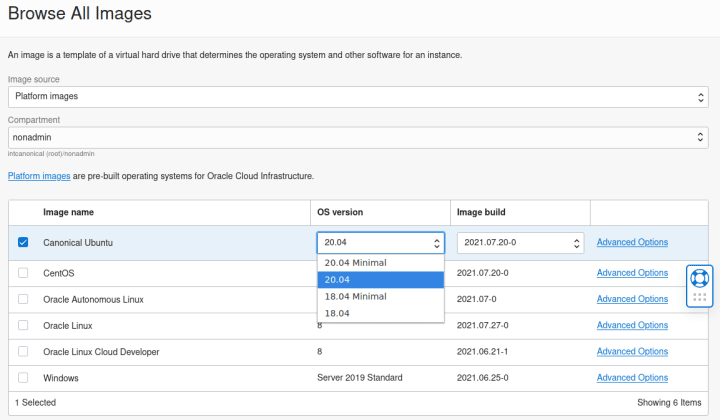
For Oracle Cloud users willing to continue to deploy Ubuntu 16.04, knowing the risks or with the goal of adding paid updates to their deployment,, the images are still available in the cloud, just not explicitly exposed due to being considered the end of support. You can obtain the appropriate Image OCIDs in the Oracle Cloud Infrastructure Documentation / Images:
From that URL, click on the Ubuntu 16.04 image that you would like to use and it will bring you to a detailed information website, which will contain the Image OCID suitable for usage in the region that you would like to deploy your instance.
With the OCID information, you can deploy the instance with the Web UI or CLI, as in the examples below:
– Web UI:
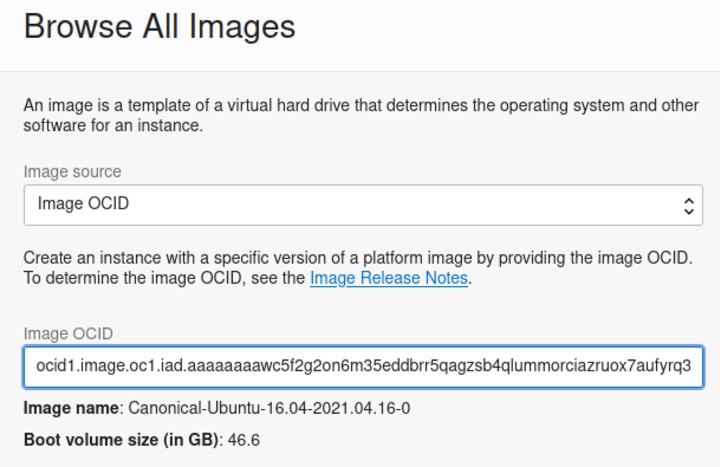
Go to ‘Compute > Instances > Create Instance’. Configure it according to your needs and click ‘Change Image’. Select ‘Image OCID’ as ‘Image Source’ and paste the OCID obtained from the Documentation URL, as in the example below and then launch the instance:
– CLI:
To launch a VM through CLI, use the ‘oci compute instance launch’ command and provide the appropriate OCID in the ‘–image-id’ parameter, as in the example below below:
$ oci compute instance launch –shape VM.Standard2.1 –display-name xenial-cli –availability-domain “qIZq:US-ASHBURN-AD-1” –compartment-id <compartment> –assign-public-ip true –subnet-id <subnet_id> –image-id ocid1.image.oc1.iad.aaaaaaaawc5f2g2on6m35eddbrr5qagzsb4qlummorciazruox7aufyrq3bq –ssh-authorized-keys-file .ssh/id_rsa.pub
Note: Although ‘oci compute image list’ will not show the Ubuntu 16.04 images, you can still get some of its information with the ‘oci compute image get –image-id <ocid>’ command, if you know the Image OCID (available in the Oracle Cloud Infrastructure Image documentation URL provided previously).
Important: The images aren’t necessarily compatible with all available shapes, to list the shapes compatible with the image you’ve selected, use the command ‘oci compute image-shape-compatibility-entry list –image-id <ocid>’
Note that although Ubuntu 16.04 has reached the end of its standard, five-year maintenance window, Extended Security Maintenance (ESM) is available through Ubuntu Advantage for Infrastructure subscriptions and also to personal users on up to three machines and Ubuntu members on 50 machines. For more information about what ESM is, how to access it, what is covered and how to enable it, please visit the Ubuntu 16.04 LTS transitions to Extended Security Maintenance (ESM) announcement.


